
Multi-Layer Zirconia Discs: Milling Tips for Natural Color Gradients
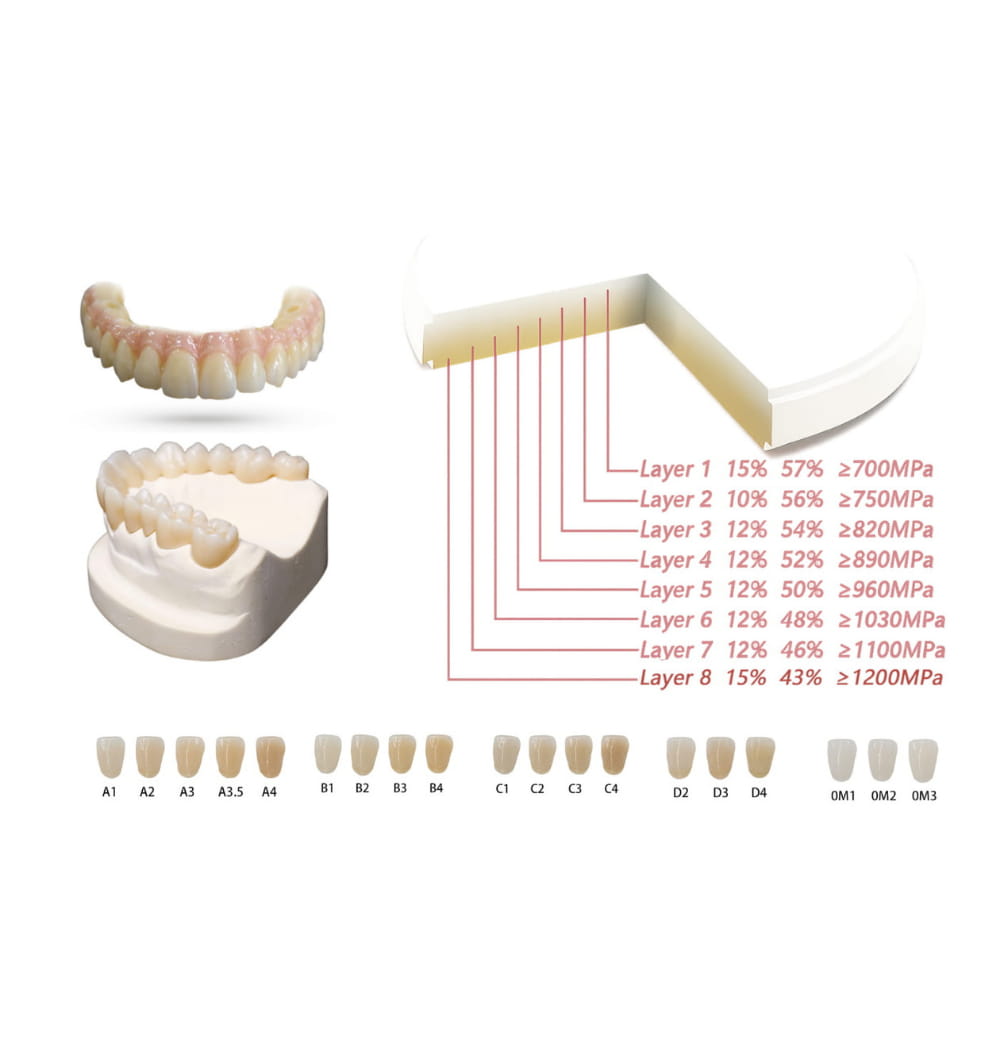
The Multi-Layer Difference
Single-shade zirconia blocks served labs well for posterior crowns where nobody looks twice at the color. But anterior work demands more. Multi-layer zirconia discs build color gradient and translucency variation directly into the blank — darker and more opaque at the cervical third, lighter and more translucent at the incisal edge. Mill it right and the crown matches the natural tooth without relying on external staining alone.
The problem: multi-layer discs are sensitive to how you position the restoration in the blank. Get the nesting wrong and the color gradient lands in the wrong place.
Understanding Layer Architecture
Most multi-layer blanks have 3-5 gradient zones transitioning from the bottom (cervical) to the top (incisal). Each zone differs in:
- Yttria content: Higher yttria = more translucency. Incisal layers run 5.2-5.8 mol%, cervical layers 3.0-3.5 mol%.
- Color saturation: Cervical zones carry more pigment (darker A3-A4), incisal zones are lighter (A1-B1)
- Flexural strength: Translucent incisal zone runs 700-900 MPa, opaque cervical zone hits 1,100-1,200 MPa
Strongest part at the margin where stress is highest, most translucent at the incisal edge where aesthetics matter. Smart engineering — but only if you position the restoration correctly.
Nesting for Natural Color: The Critical Step
CAM software typically shows the disc cross-section with color layers. Place the restoration so that:
- The cervical margin sits in the bottom 20-25% of the disc (darkest, most opaque zone)
- The incisal edge reaches the top 15-20% (lightest, most translucent zone)
- The body spans the middle gradient zones
For bridges, all units need consistent vertical positioning. A bridge where one pontic sits higher in the disc than the adjacent retainer will show visible color mismatch after sintering. Nest the entire framework at the same vertical level.
Anterior vs Posterior Positioning
Anterior crowns benefit from positioning slightly higher to maximize incisal translucency. Posteriors go lower to keep more strength at the occlusal surface. Premolars split the difference — center them.
Milling Parameters for Multi-Layer Discs
Multi-layer blanks mill the same as standard zirconia — the layer boundaries don't create stress concentrations during machining. Two things to watch:
Avoid Aggressive Roughing Near Layer Transitions
The gradient zones are created by stacking different zirconia powders before pressing. At the boundaries, the material can be slightly more porous. Aggressive roughing with worn zirconia milling burs near these transitions can cause micro-chipping that becomes visible after sintering as white spots or lines. Use medium-grit diamond burs at standard roughing parameters: 12,000-18,000 RPM, 800-1,200 mm/min feed rate.
Finishing Pass Direction
Run the finishing pass from incisal toward cervical — top-down. This keeps finer cutting forces moving from the weaker translucent zone toward the stronger opaque zone, reducing chipping risk at the incisal edge. Most CAM software lets you control toolpath direction in the finishing strategy.
Sintering Multi-Layer Zirconia
Standard sintering profiles work for most multi-layer discs, but note:
- Ramp rate: Follow manufacturer specs exactly. Multi-layer discs warp if heated too fast because different yttria contents shrink at slightly different rates early in sintering.
- Hold temperature: Typically 1,450-1,550°C depending on brand. Don't exceed the recommended max — oversintering destroys the translucency gradient.
- Cooling rate: Controlled cooling prevents thermal shock cracks. Don't open the furnace door early.
Post-Sintering Color Adjustment
Multi-layer discs reduce — but don't eliminate — the need for external coloring. After sintering, you'll typically need:
- Minimal staining for shade fine-tuning at the cervical margin and incisal halo
- Glaze firing to seal the surface and add lifelike luster
- No full-coverage painting — if you're painting the entire crown, the nesting was wrong
Multi-layer zirconia doesn't replace craftsmanship. It gives you a 70-80% head start on shade matching, so manual work focuses on fine details instead of basic color correction. For labs comparing monolithic vs layered approaches, multi-layer discs offer the best middle ground — good aesthetics with minimal chairside adjustment.