
Sirona MCXL Milling Bur Selection: Materials, Replacement, and Tips
The MCXL: Still the Machine Most Offices Actually Use
Walk into any dental office running CEREC and odds are you'll find a Sirona MCXL sitting in the corner. Not the Primemill. Not the MC X5. The MCXL. It's a 4-axis wet mill that Dentsply Sirona has been selling in various forms for over a decade, and there's a reason it refuses to die. It's reliable, it's paid off, and it mills a single crown in under 15 minutes. For most chairside milling workflows, that's all you need.
The MCXL runs two burs simultaneously — one for roughing, one for finishing — using a wet milling process with a built-in water spray. Four axes of motion. No dry milling option, no five-axis repositioning tricks. What it does, it does well: single-unit restorations from a block, chairside, same appointment. Inlays, onlays, crowns, veneers. The bread and butter of restorative dentistry.
Yes, the Primemill is faster. Yes, it can handle larger indications. But the MCXL install base is enormous, replacement parts are available, and the software still supports it fully. Plenty of offices are milling 5-10 units a week on these things with zero intention of upgrading. If it works, it works.
Bur Types and What Actually Goes in the Spindle
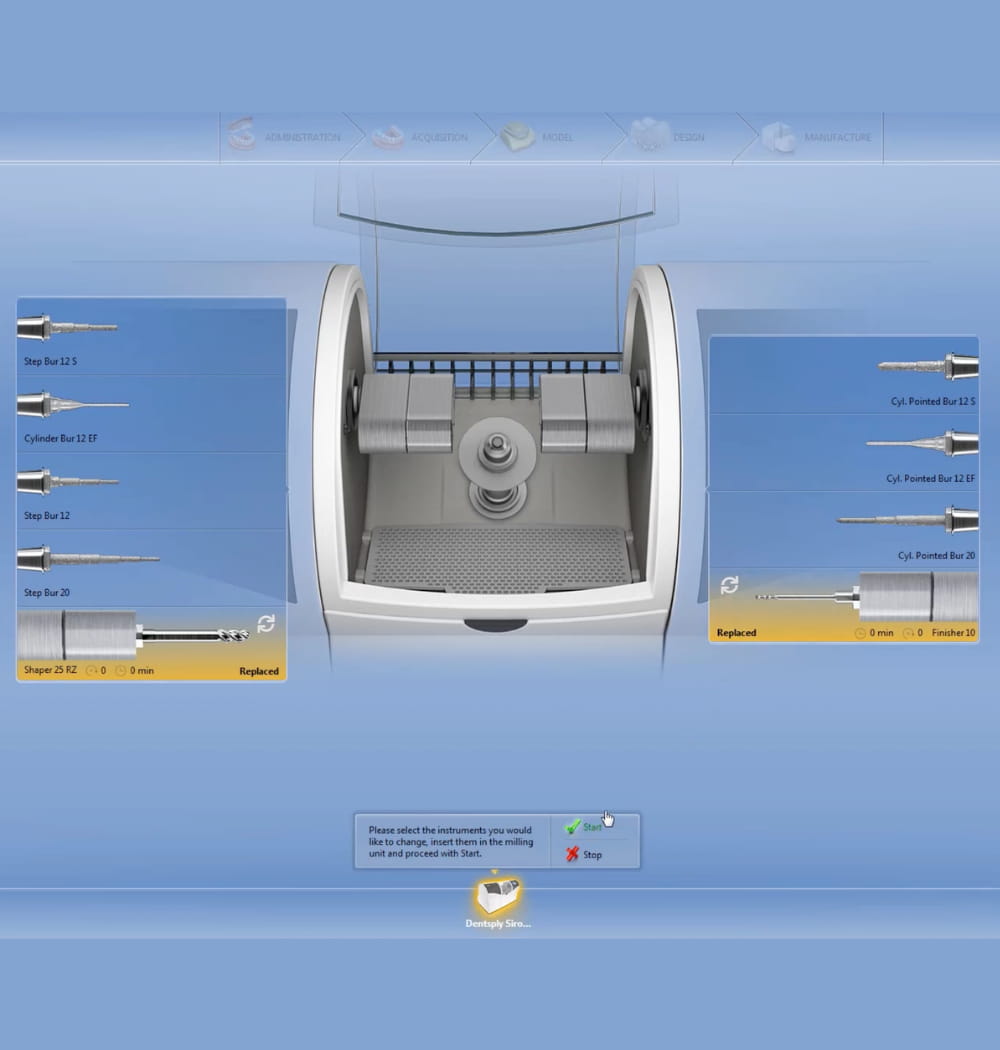
The MCXL uses a specific bur system that's different from lab mills. You're dealing with two basic geometries:
- Step burs (12S and 12) — These are the cylindrical diamond burs with a stepped profile. The 12S is the smaller step bur used for fine detail and finishing. The 12 is the larger roughing bur. Together, they handle the bulk of MCXL milling. The step design lets the bur cut at multiple diameters, which matters when you're carving occlusal anatomy and margin detail on a 4-axis machine.
- Cylindrical pointed burs (Cyl Pointed) — A tapered diamond bur used for detail work, especially on the internal fit surface and fine margin finishing. Some material/indication combos in the CEREC software will call for this geometry instead of or alongside the step burs.
The CEREC software selects the bur pair automatically based on the material and restoration type you've chosen. You don't pick burs manually — the software tells you what to load. If you've got the wrong burs seated, the machine will throw an error before it starts. Which is actually one of the smarter design decisions Sirona made.
One thing that catches people: the MCXL burs have an RFID chip in the shank. The machine reads this chip to track usage count, bur type, and remaining life. More on that in a minute, because the numbers the machine gives you and the numbers you should actually follow aren't always the same thing.
Materials: What the MCXL Handles Well (and What It Fights You On)
The MCXL was originally designed around feldspathic ceramics — your classic CEREC Blocs. Vita Mark II, CEREC Bloc C, that sort of thing. These are forgiving materials. Relatively soft, predictable cutting behavior, easy on burs. If all you ever milled was feldspathic ceramic, your burs would last a long time and your life would be simple.
Then lithium disilicate happened.
IPS e.max CAD is the material that changed chairside milling. Stronger, more aesthetic, better long-term clinical performance than feldspathic. It also mills in a pre-crystallized "blue state" that's softer than the final product — which is the only reason the MCXL can handle it at all. But even in that blue state, lithium disilicate is significantly harder on burs than feldspathic. Expect roughly half the bur life. Sometimes less, depending on your restoration size and how aggressively the toolpath cuts.
Here's the full material picture for the MCXL:
| Material | Examples | Bur Wear | Notes |
|---|---|---|---|
| Feldspathic ceramic | CEREC Blocs, Vita Mark II | Low | The MCXL's comfort zone. Clean cuts, long bur life. |
| Lithium disilicate | IPS e.max CAD | Moderate-High | Pre-crystallized state. Watch for chipping at margins. Requires crystallization firing after milling. |
| Zirconia (limited) | CEREC Zirconia | High | The MCXL can technically mill pre-sintered zirconia, but it's slow and hard on everything. Most offices send zirconia out. |
| Hybrid ceramic | VITA Enamic, Cerasmart | Low-Moderate | Polymer-infiltrated ceramics. Mill nicely, good bur life. |
| PMMA / Composite | Telio CAD, CEREC Guide Bloc | Very Low | Provisionals and surgical guides. Almost no bur wear. |
Zirconia on the MCXL deserves a special mention. Can you do it? Technically yes. Should you plan your workflow around it? Probably not. The 4-axis limitation means you're not getting the detail a 5-axis lab mill delivers, and the cycle times are painful. If you're doing serious zirconia volume, you need a different machine — or a lab partner.
When to Replace Burs: The Machine's Count vs. Reality
The MCXL tracks bur usage through that RFID chip. The machine will warn you when a bur is approaching its rated life and eventually lock you out from using it. Sirona's official numbers are conservative in some ways and optimistic in others. The system might say a bur has 50 mills left when the cutting edges are already degrading.
Here's what actually matters: surface finish quality and margin integrity. If your restorations are coming out with rougher surfaces than usual, or your margins are chipping instead of cutting clean — the bur is done regardless of what the counter says. Trust your eyes and your fingers (run a gloved finger along the margin) over the digital readout.
Some real-world guidelines:
- Feldspathic only: You'll often get close to the machine's rated count. Maybe even exceed it slightly before you notice degradation.
- Mostly e.max: Cut the machine's estimate by 30-40%. A bur rated for 50 mills on feldspathic might give you 25-30 good mills on e.max before margins start suffering.
- Mixed materials: This is where it gets fuzzy. The machine doesn't weight different materials differently in its count — a mill is a mill as far as the RFID tracker cares. You have to compensate mentally.
- Zirconia: Murders burs. If you're milling zirconia regularly, replace burs at half the machine's suggested life minimum.
The cost of a premature bur change is a few dollars. The cost of a bad margin on a seated crown is a remake. Easy math.
OEM vs. Compatible Burs: The Money Question
Sirona OEM burs are expensive. No way around it. And when you're running through them faster because of e.max volume, the per-unit cost of your restorations climbs. This is where compatible aftermarket burs enter the conversation.
Good compatible burs — and the emphasis is on "good" — match OEM geometry, diamond grit quality, and shank tolerances. They fit the MCXL spindle correctly, the RFID chip registers properly, and they cut. At significantly lower cost per bur. We're talking 40-60% savings depending on the supplier.
What to watch for with compatibles:
- Concentricity. A bur that wobbles even slightly will produce rough surfaces and accelerate spindle wear. This is the number one differentiator between good and bad aftermarket burs.
- Diamond coating consistency. Uneven grit means uneven cutting. You'll see it in the surface texture of your restoration before you see it anywhere else.
- Shank diameter tolerance. Too tight and it won't seat. Too loose and you get vibration. Either way, problems.
- RFID compatibility. The bur needs to register with the MCXL's reader. Not all aftermarket burs handle this correctly.
If you're considering the switch, browse Sirona MCXL compatible burs and start with a single set to test against your OEM baseline. Mill a couple of e.max crowns — that's the real stress test. Compare surface finish, margin quality, and how the bur looks after 10-15 mills. If the results hold up, you've just cut a meaningful chunk out of your consumables budget.
Common MCXL Problems and How to Deal With Them
Bur breakage on e.max
This is the big one. The 12S finishing bur is the usual victim — it's small, it's doing detail work, and lithium disilicate doesn't care about your schedule. Most breakage comes from one of three things: worn burs that should've been replaced two mills ago, a block that isn't fully seated in the holder, or coolant nozzles that are partially clogged. Check all three before blaming the bur.
When milling e.max, make sure the water spray is actually hitting the cutting zone. Grab a flashlight and watch it during a cycle. If the spray pattern has shifted or a nozzle is calcified, you're generating heat at the cut — and that's when burs snap. Clean your nozzles weekly. Takes two minutes. Use a glass ceramic-rated bur set with fresh diamond coating, not one that's been grinding feldspathic for a month.
Calibration drift
The MCXL needs periodic calibration, and it tends to drift slowly enough that you don't notice until your margins are consistently 50 microns off. Run the calibration routine monthly at minimum. After any bur change is even better. The machine walks you through it — there's no excuse to skip it.
Block seating errors
The block holder mechanism on the MCXL is straightforward, but blocks that aren't fully clicked in will shift during milling. The result is either a ruined restoration or, worse, a subtle fit issue you don't catch until try-in. Push the block in, hear the click, tug gently to confirm. Every time. No exceptions. Also check that the holder itself isn't worn — they do fatigue over time, and a sloppy holder means a sloppy seat.
Getting Better Margins on Chairside Crowns
Margins are where chairside milling lives or dies. A few things that actually make a difference on the MCXL:
- Scan quality matters more than milling quality. Garbage in, garbage out. If your preparation margin isn't clearly captured in the CEREC scan, no amount of milling precision will save you. Retake the scan if there's any ambiguity at the margin line.
- Use fresh burs for demanding cases. That anterior e.max crown on #8 with a thin facial margin? Don't mill it with a bur that has 40 mills on it. Start a fresh set. The cost difference is negligible compared to the remake.
- Check your spacer settings. The default cement gap in CEREC software is a starting point, not gospel. If your crowns are consistently tight or loose, adjust by 10-20 microns and test. Every office has its own sweet spot depending on cement type and seating technique.
- Finish the margins by hand. This isn't a failure of the machine — it's reality. A quick pass with a fine diamond or rubber wheel on the margin area takes 60 seconds and makes a real clinical difference. The MCXL gets you 90% of the way there. The last 10% is your handpiece.
- Don't skip the try-in. Seat the crown on the die or in the mouth before you commit to cementation. Check the margins with an explorer. If something feels off, it probably is.
The MCXL is a fifteen-year-old platform design that still produces clinically excellent restorations when you respect its limitations and maintain it properly. It's not the fastest, it's not the flashiest, and Sirona would love for you to upgrade. But for single-unit chairside work — which is still what most CEREC users do most of the time — it does the job. Keep your burs fresh, your calibration current, and your scan quality high. The machine will hold up its end.